“Which board should I use?” is the wrong question until you answer three others: does it need a radio, does it run on a battery, and does it have to survive 5 V sensors? Answer those and the choice between an ESP32, an ESP8266 and an Arduino Uno R4 usually makes itself.
This is the comparison we give students at eARgle Innovation Labs — not a spec dump, but the decision rules that hold up on real projects, plus an honest look at where each board wastes your time. It also covers the part most comparisons skip: which member of the ESP32 family to pick, because “ESP32” in 2026 means at least eight different chips.
Contents
The short answer
Default choice
Wi-Fi + BLE, enough RAM for TLS and a display, deep sleep in microamps. Start here unless you have a reason not to.
Cheapest Wi-Fi
One job, mains-powered, sends a number to a server. Proven, cheap, well documented. No BLE, one ADC.
Teaching & 5 V shields
When 5 V tolerance, the Uno footprint, CAN bus or a real DAC matter more than power draw or price.
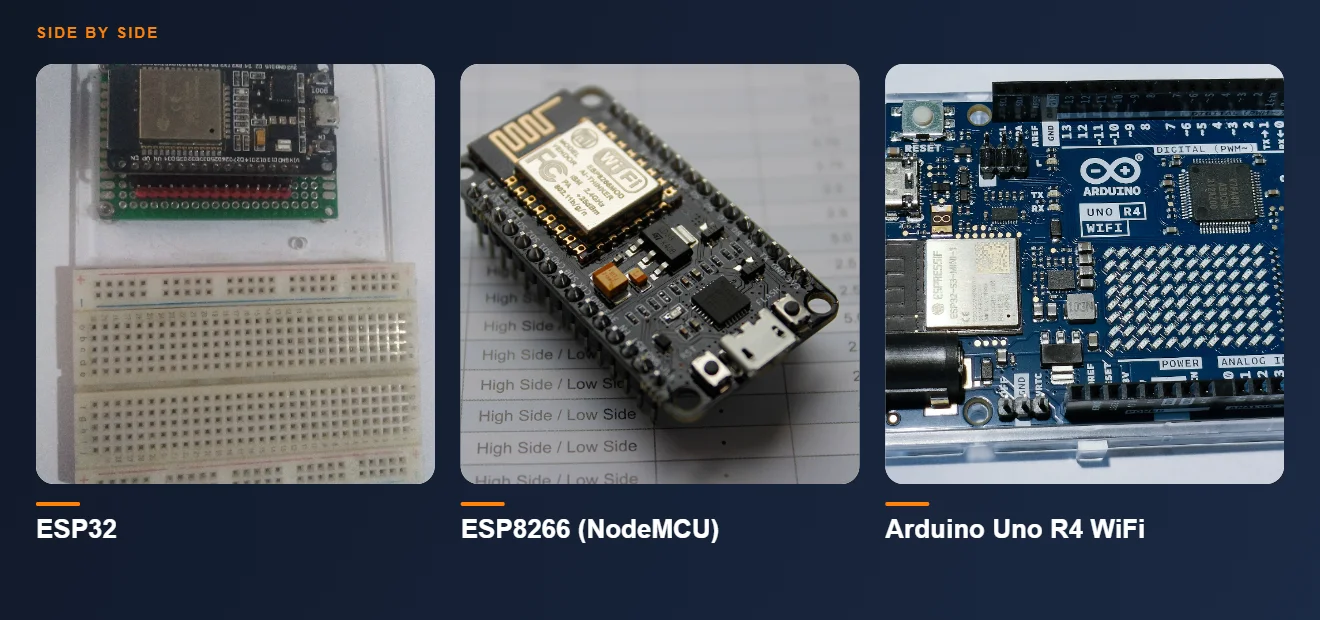
Head-to-head specifications
| ESP8266 (NodeMCU) | ESP32 (classic WROOM) | ESP32-C3 | Arduino Uno R4 WiFi | |
|---|---|---|---|---|
| Core | Xtensa L106, single | Xtensa LX6, dual | RISC-V, single | Arm Cortex-M4 (Renesas RA4M1) + ESP32-S3 radio |
| Clock | 80 / 160 MHz | 240 MHz | 160 MHz | 48 MHz |
| SRAM | ~50 KB usable | 520 KB | 400 KB | 32 KB |
| Flash | 4 MB typical | 4–16 MB | 4 MB | 256 KB |
| Wi-Fi | 802.11 b/g/n | 802.11 b/g/n | 802.11 b/g/n | 802.11 b/g/n (via co-processor) |
| Bluetooth | — | Classic + BLE 4.2 | BLE 5.0 | BLE 5.0 (via co-processor) |
| Logic level | 3.3 V | 3.3 V | 3.3 V | 5 V |
| ADC | 1 × 10-bit (0–1 V) | 18 × 12-bit | 5 × 12-bit | 6 × 14-bit |
| DAC | — | 2 × 8-bit | — | 1 × 12-bit |
| Native USB | No (UART bridge) | No (UART bridge) | Yes | Yes |
| Deep sleep | ~20 µA | ~10 µA | ~5 µA | ~1 mA at best |
| Extras | — | Touch, Hall, 2 × I²S | USB Serial/JTAG | CAN bus, OPAMP, 12×8 LED matrix, Qwiic |
32 KB on the Uno R4 versus 400–520 KB on the ESP32 family is the difference that decides architecture. An HTTPS request with a certificate chain needs tens of kilobytes of buffer by itself. On an ESP32 that is routine; on 32 KB it is a project in its own right.
ESP8266 — still the cheapest way onto Wi-Fi
The ESP8266 is old and still the right answer surprisingly often. If the job is “read one sensor, push it to a server or to Blynk, plugged into a wall”, it does that for less money than anything else, with a decade of tutorials behind every error message you will hit.
Where it hurts:
- One ADC, and it reads 0–1 V. NodeMCU boards add a divider to get 0–3.3 V on A0, but you still have exactly one analog input. Two analog sensors means an external ADS1115.
- No Bluetooth at all. No BLE provisioning, no phone-app-over-BLE, no beacons.
- Pin traps. GPIO0, GPIO2 and GPIO15 decide boot mode. Put a sensor that pulls GPIO0 low on power-up and the board boots into flash mode instead of your sketch — the single most common “my project stopped working” report we see.
- ~50 KB of usable RAM. TLS works, but with care and without also driving a display.
Our smart irrigation build still runs on an ESP8266 for exactly these reasons — it is mains-powered, it needs one Wi-Fi connection, and the cost per node matters. See the full build log for the pin choices that avoid the boot traps.
ESP32 — and which variant to actually buy
“ESP32” is a family, not a chip. Picking the wrong member is how people end up with a board that cannot do Bluetooth Classic, or one that costs three times what the project needed. The practical map for 2026:
| Variant | Core | Wireless | Pick it when |
|---|---|---|---|
| ESP32 (classic) | Dual Xtensa LX6, 240 MHz | Wi-Fi 4, BT Classic + BLE | You specifically need Bluetooth Classic (A2DP audio, SPP serial) or the widest library compatibility |
| ESP32-S3 | Dual Xtensa LX7, 240 MHz | Wi-Fi 4, BLE 5 | Cameras, displays, PSRAM, or on-device ML — it has vector instructions for neural-network maths |
| ESP32-C3 | Single RISC-V, 160 MHz | Wi-Fi 4, BLE 5 | Sensor nodes, wearables, battery work. Cheap, low-power, native USB. Our µEC3 guide covers one in detail |
| ESP32-C6 | Single RISC-V, 160 MHz | Wi-Fi 6, BLE 5.3, Thread + Zigbee | Smart-home devices that must speak Matter, or mesh sensor networks |
| ESP32-C5 | Single RISC-V, 240 MHz | Wi-Fi 6 dual-band (2.4 + 5 GHz), BLE, Thread | The 2.4 GHz band is congested — campus and apartment deployments |
| ESP32-H2 | Single RISC-V, 96 MHz | BLE 5, Thread, Zigbee — no Wi-Fi | Battery endpoints in a Thread/Zigbee mesh where a gateway does the internet |
| ESP32-P4 | Dual RISC-V, 400 MHz | None — needs a companion radio | Display and multimedia work, H.264 encoding. Arduino support is still thin; expect ESP-IDF |
For a general project in 2026: ESP32-S3 if it has a screen, a camera or any ML; ESP32-C3 if it is a battery sensor node; ESP32-C6 if the words “Matter” or “smart home” appear in the brief. Buy the classic ESP32 only for Bluetooth Classic or legacy library support.
Arduino Uno R4 — what it is really for
Judged on price per megahertz, the Uno R4 loses to every ESP32. That is the wrong yardstick. The R4 exists because a large amount of the world’s teaching hardware, shields and lab equipment assumes the Uno footprint and 5 V logic, and it hands you peripherals the ESP32 family does not have.
The R4 WiFi pairs a 48 MHz Renesas RA4M1 (Arm Cortex-M4) with an ESP32-S3 module that handles Wi-Fi and BLE, so the radio work happens on a co-processor rather than competing with your sketch for cycles. It brings a true 12-bit DAC, a 14-bit ADC, an on-chip operational amplifier, a CAN bus controller, a Qwiic I²C connector and a 12 × 8 LED matrix on board.
Choose the R4 when:
- You have 5 V sensors, relay boards or motor shields and do not want level shifters on every line.
- You need CAN bus — automotive, a BLDC controller, industrial gear. No ESP32 dev board gives you that for free.
- You need a real analog output (waveform generation, control voltage), not a filtered PWM approximation.
- You are teaching, and want the standard Uno pin diagram that every textbook and shield on the shelf already matches.
Avoid the R4 when: the project runs on a battery (its idle draw is in milliamps, not microamps), when you need real memory for TLS or a framebuffer, or when cost per node matters.
Battery life: the numbers that decide it
Deep-sleep current is where these boards separate hardest. A realistic sensor node that wakes once every 15 minutes, takes a reading, sends it over Wi-Fi in about 3 seconds and sleeps again, on a 2000 mAh cell:
| Board | Deep sleep | Active (Wi-Fi TX) | Rough life on 2000 mAh |
|---|---|---|---|
| ESP32-C3 bare module | ~5 µA | ~120 mA peak | Many months — sleep is not the limiting factor, self-discharge is |
| ESP32 classic (dev board) | ~10 µA chip, but 0.5–5 mA on a dev board with USB-UART + regulator | ~160–260 mA peak | Days to a few weeks on a dev board; months on a bare module |
| ESP8266 (NodeMCU) | ~20 µA chip, ~1–3 mA on the dev board | ~80–170 mA peak | Weeks on a bare module; days on NodeMCU |
| Arduino Uno R4 WiFi | ~1 mA best case, no true deep sleep | ~90 mA+ | ~2–3 days — not a battery board |
Datasheet sleep currents are for the bare chip. A dev board adds a USB-UART bridge, a power LED and a regulator with quiescent draw — together often 100× the chip’s sleep current. If a project must last months on a cell, either use a board designed for it (native-USB boards with no bridge chip, like the ESP32-C3 class) or desolder the LED and bridge. Measure it; do not trust the datasheet.
Pick by project
| Project | Board | Reason |
|---|---|---|
| Soil moisture → cloud, mains powered | ESP8266 | One sensor, one connection, lowest cost per node |
| Battery sensor in a wall or wearable | ESP32-C3 | Microamp sleep, native USB, small board |
| Anything with a TFT display or camera | ESP32-S3 | PSRAM support and the memory bandwidth for a framebuffer |
| BLE device that talks to a phone app | ESP32-C3 or S3 | BLE 5 with a modern stack; ESP8266 cannot do it at all |
| Matter / Google Home / Alexa native device | ESP32-C6 | Thread and Zigbee radios plus Wi-Fi 6 in one chip |
| Reading a car’s OBD / CAN bus | Arduino Uno R4 | On-board CAN controller; ESP32 needs an external transceiver and TWAI setup |
| Classroom kit, 5 V shields, no internet | Arduino Uno R4 (or Uno R3) | 5 V logic and the standard footprint every shield expects |
| Voice keyword detection on device | ESP32-S3 | Vector instructions make TinyML inference practical — see our edge AI guide |
Frequently asked questions
Is the ESP32 just a better ESP8266?
In capability, yes: more cores, roughly ten times the RAM, Bluetooth, many more ADC channels, and better deep-sleep behaviour. But “better” is not “drop-in”. Pin numbers differ, some ESP8266 libraries have no ESP32 equivalent, and the ESP32 draws more current while transmitting. For an existing, working ESP8266 project with no BLE requirement, migrating buys you little.
Can I use 5 V sensors with an ESP32?
Yes, with care. Power the sensor from 5 V and shift its output down: a 1 kΩ / 2 kΩ divider for a slow digital signal, or a proper bidirectional level shifter for I²C. Feeding 5 V straight into an ESP32 GPIO exceeds its ~3.6 V maximum and damages the pin — sometimes immediately, often slowly. The Arduino Uno R4’s 5 V logic is precisely why it still earns a place on the bench.
Which board is best for a college final-year project?
An ESP32 (classic WROOM-32 or C3) in almost every case: it covers Wi-Fi, BLE, plenty of analog inputs and enough memory that your architecture is not fighting the hardware, and the examiner’s “can it connect to the cloud?” question has a one-word answer. Use an Uno R4 instead if your project centres on 5 V industrial sensors, CAN bus or analog signal generation.
Do I need an external antenna version?
Only if the board goes inside metal, underground, or more than about 15 m from the access point through walls. The PCB trace antenna on a standard module is adequate for a room or a small building. If you do fit an external antenna, keep the module’s own antenna region clear of copper and mounting screws — a ground plane under a trace antenna costs more range than a cheap external antenna gains.
What about the Raspberry Pi Pico W?
It is a genuine alternative: dual Cortex-M0+, 264 KB RAM, Wi-Fi and BLE, excellent MicroPython support, and the PIO state machines are unmatched for custom digital protocols. Choose the Pico W for PIO tricks or if your team already writes MicroPython; choose the ESP32 family for lower sleep current, richer analog peripherals and the much larger IoT library ecosystem.
Learn on the boards, not just about them
The eARgle Arduino & IoT course works through ESP8266 and ESP32 projects on real hardware, with the kits shipped to your door.
Explore the courses See the kits
2 Comments.
Comments are closed.